For Apple Home, choose the control path first: a ceiling fan with built-in HomeKit, a compatible wall controller for an existing AC fan, or an on/off smart plug for a suitable plug-in fan. These options solve different problems.
As an Amazon Associate, TheFansPro earns from qualifying purchases.
Evidence: Spec-verified. Exact models, manufacturer requirements and Amazon listings checked October 2, 2026. These are specification-based recommendations; no hands-on installation or performance test is claimed. Availability can change.
HomeKit fan options at a glance
| Option | Best fit | Apple Home controls | Check before buying |
|---|---|---|---|
| Hunter Aerodyne 52-inch — model 51315 | New indoor ceiling fan | Built-in HomeKit; fan speed and light control | 2.4 GHz Wi-Fi; install the exact fan model |
| Meross MFC100 fan and light control | Keep a compatible AC fan | HomeKit; fan speed plus light dimming | Neutral, separate fan/light loads, single-pole wiring |
| Kasa KS240 fan control and light dimmer | AC pull-chain fan with a light | Apple HomeKit; four speeds and dimming | Neutral, separate loads, single-pole wiring |
| Lutron Caséta PD-FSQN fan-speed control | Fan-only wall control | Four speeds; Apple Home through a Caséta hub | Neutral; compatible AC paddle fan; hub sold separately |
| Eve Energy Matter smart plug — US version | On/off for a suitable plug-in fan | Matter over Thread; on/off only | Compatible Matter controller and Thread border router |
A wall speed controller must match the motor and wiring. A smart plug only switches power. If you are unsure what is in the wall, have an electrician identify it before ordering a controller. Use our smart ceiling fan compatibility guide to narrow the control path.
A new ceiling fan with built-in HomeKit
Hunter Aerodyne 52-inch — model 51315

- Built-in HomeKit; fan speed and light control
- 2.4 GHz Wi-Fi; install the exact fan model
This matte-silver Aerodyne is the complete-fan option here. Hunter’s manual identifies model 51315 and includes the HomeKit pairing label. Its included remote gives you a separate way to operate it. Choose it if you need both a new indoor fan and Apple Home control.
When to skip it: Skip it if you need an outdoor rating, a flush-mount installation, or a different blade span. Check the installation dimensions before ordering.
Manufacturer compatibility and setup requirements.
If the light matters as much as smart control, compare Hunter ceiling fans with verified light output. For room fit, start with the ceiling fan size chart and calculator.
Keep a compatible AC ceiling fan
Choose from these controllers only after checking the exact fan manual and wiring. Do not replace a manufacturer’s required DC or remote controller with a generic AC speed switch.
Meross MFC100 fan and light control
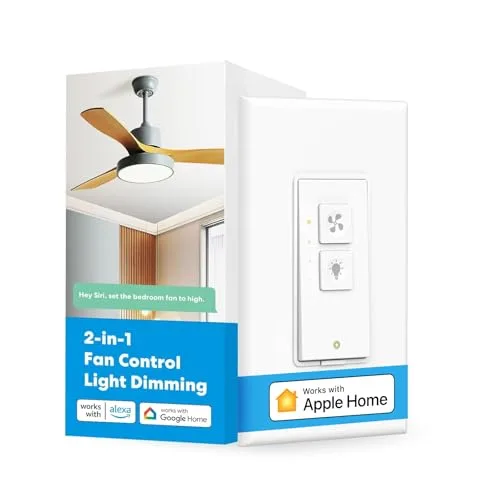
- HomeKit; fan speed plus light dimming
- Neutral, separate fan/light loads, single-pole wiring
The MFC100 replaces a compatible wall control, not the fan. Meross lists three or four fan speeds and a separate light dimmer. It needs a neutral wire, separate fan and light load wires, and 2.4 GHz Wi-Fi.
When to skip it: Skip DC-motor fans, integrated remote-controlled fans, and smart bulbs. A fan that works with a basic wall switch is not automatically compatible with this speed controller.
Manufacturer compatibility and setup requirements.
Kasa KS240 fan control and light dimmer
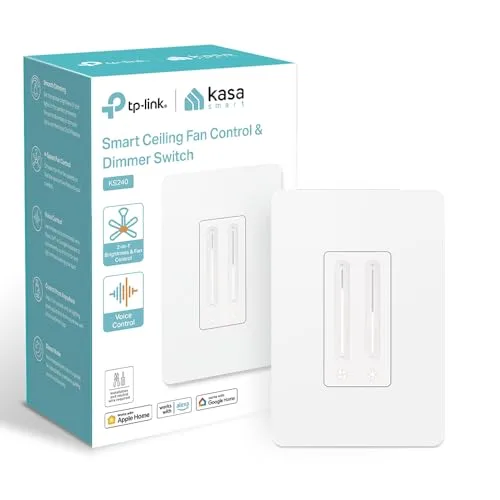
- Apple HomeKit; four speeds and dimming
- Neutral, separate loads, single-pole wiring
The KS240 supports Apple HomeKit and combines four fan-speed settings with light dimming. TP-Link limits it to compatible AC pull-chain fans and requires a neutral, separate load wires, and 2.4 GHz Wi-Fi.
When to skip it: Skip DC fans and fans with built-in speed control operated by remote, Bluetooth or Wi-Fi. Confirm your dimmable bulbs are supported too.
Manufacturer compatibility and setup requirements.
Lutron Caséta PD-FSQN fan-speed control

- Four speeds; Apple Home through a Caséta hub
- Neutral; compatible AC paddle fan; hub sold separately
This controls fan speed only; it is not a fan-and-light dimmer. Lutron’s instructions specify one compatible AC paddle fan, a neutral wire, and a 1.5-amp maximum. Apple Home integration requires the compatible Caséta hub.
When to skip it: Skip DC motors, exhaust fans, and combined fan/light loads. For a fan with an integrated receiver or remote, ask Lutron about that exact model before buying.
Manufacturer compatibility and setup requirements.
Apple Home on/off for a plug-in fan
Eve Energy Matter smart plug — US version

- Matter over Thread; on/off only
- Compatible Matter controller and Thread border router
Eve Energy adds power switching to a suitable plug-in fan. It does not turn a basic fan into a variable-speed HomeKit fan. Eve specifies a compatible Matter controller and Thread border router for this Thread model.
When to skip it: Skip fans that stay off after power is restored. Check the fan and plug manufacturer’s load and operating restrictions; do not use this plug for a hardwired ceiling fan.
Manufacturer compatibility and setup requirements.
What about a fan that already has a remote?
Do not assume a wall controller can replace its receiver. Bond now documents an Apple Home integration for supported devices on Bond Bridge and Bridge Pro, including supported ceiling fans. Bond says this integration is unofficial and not Apple-certified; Smart by Bond devices are excluded. Check your exact fan, bridge firmware and configuration with Bond’s current integration instructions before purchasing. This is an advanced compatibility route, not a guaranteed substitute for built-in HomeKit.
HomeKit, Matter and hubs: what to verify
A listing that says Alexa, Google or Matter does not by itself verify fan control in Apple Home. Apple’s supported Matter accessory list does not currently list fans. This guide therefore does not recommend Haiku or Modern Forms as verified native Apple Home fan purchases.
A Wi-Fi HomeKit accessory can pair without a separate vendor bridge when its instructions allow it. That is different from remote access and automations: Apple’s automation instructions require a home hub. Lutron’s hub and Eve’s Thread requirements are additional product-specific checks. Verify your exact Apple TV or HomePod model before buying an accessory that depends on it.
HomeKit fan FAQ
Can Siri control ceiling fan speed?
Yes, when the supported fan or controller exposes fan-speed control to Apple Home. A smart plug provides on/off power only.
Can I make any ceiling fan HomeKit-compatible?
No. Wall speed controls have motor and wiring restrictions. DC fans and fans with integrated remote controls need an explicitly supported control path.
Which complete fan is verified here for HomeKit?
The Hunter Aerodyne 52-inch matte-silver model 51315 is the complete fan checked for this guide. Verify the model number and HomeKit pairing label on the unit you receive.
Do I need a hub?
It depends on the product and features. Lutron requires its compatible hub for Apple Home; Eve Energy Matter uses Thread and requires compatible hub infrastructure. Apple Home remote access and automations also require a home hub.
